


Where Have You Been?
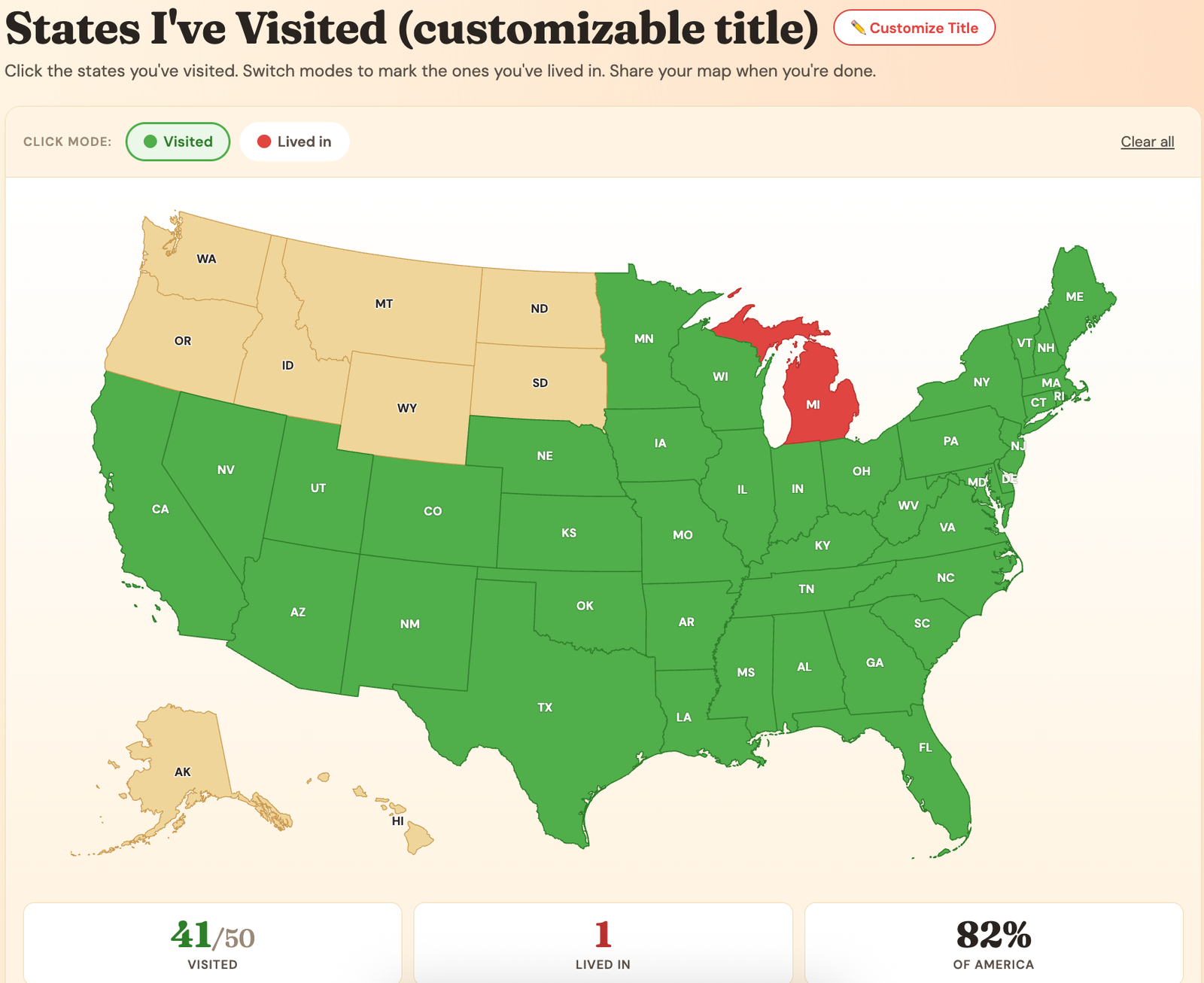
Click the states you've visited. Switch modes to mark the ones you've lived in. Share your map when you're done.
Track Every State You've Visited
This map is built for the road trippers who keep losing count of how many states they've been to. Click each state you've visited — it turns green. Switch to "Lived in" mode and click the states you've actually called home — they turn red. Click any state again to undo it.
The stats below the map update as you click — total states visited, states lived in, and your percentage of the USA explored. When you're happy with your map, hit Share to send it to friends, post it on social, or save it as a personal record. The image you share has your stats and a link back here so anyone who sees it can make their own.
Why a States Map Hits Different
There's something about visualizing your travel history that hits harder than a list. A list of states you've been to is just text. A map is a story. You can see the road trips you took, the gaps where you've never been, the regions you've barely scratched, and the next states that are practically begging to be added.
For a lot of people, the map starts a project. "Wait, I've never been to Idaho?" "How is North Dakota still empty?" "We're 4 states away from completing the Midwest." Suddenly there's a goal — and goals are how trips happen.
How This Map Is Different
Most "states visited" maps online give you one mode: click states, see total. Ours has two — "visited" AND "lived in" — because where you've lived is part of your travel story too. A 5-year-old kid who lived in Nebraska for a year has a different relationship with that state than someone who drove through it once on the way to Yellowstone. Both count, but they're not the same.
The other thing — your map is yours to share. Hit the share button, get a clean image with your stats and a small mention of where it came from, and send it wherever. Friends, family, social media, group chat, however you want. We're not trying to lock you into an account or save your data. Just play with the map, share it, come back next year and update it.
Customize Your Map Title
Make this map yours. Track anything you want — concerts, beaches, BBQ spots, family visits. The title shows on your shared image.
Got your gaps? Now plan the trip that fills them.
Our free Trip Itinerary Planner lays out your route, stops, and days — no signup, same as this map. Just you and the open road.
Track Anything You Want Across The USA
Most “states I’ve visited” maps online have one job — count the states you’ve been to. This one’s different. You can rename the map to track ANYTHING that happens state by state. States I’ve eaten BBQ in. Concerts I’ve seen. Road trips with my husband. National parks I’ve visited. Whatever you want.
Click the ✏️ Customize Title button at the top of the map and rename it. The new title shows on your live map AND on the image you share. Suddenly it’s not “Where I’ve Been” — it’s “States I’ve Caught a Trout In” or “States My Kids Have Slept In” or whatever your specific brand of weird is.
Click each state that matches your goal — it turns green. Switch to “Lived in” mode for any state where you’ve actually called home. Stats update live. Share when you’re done.
How to Use the Map
Step 1 — Customize your title (optional but fun). Click the “Customize Title” button next to the heading. Type in whatever you want to track. Don’t have an idea yet? Tap one of the example hints (BBQ, concerts, road trips together, etc.) to auto-fill it. Hit Save and your map is now yours.
Step 2 — Click states to mark them. Visited mode is on by default. Click any state that matches your goal — it turns green. Switch to “Lived in” mode and click the states you’ve actually called home. Click any state again to remove it.
Step 3 — Watch the stats update. Three numbers update as you click: total marked, lived in count, and percentage of America covered. The percentage hits harder than people expect.
Step 4 — Share it. Hit the red Share button. On your phone, your share menu pops open with all your apps. On a computer, you’ve got Facebook, Pinterest, Twitter, and Copy Link options. The image gets generated automatically with your title and stats baked in.
“I’ve Already Been to All 50 States”
Cool — congrats, you’re in the under 5% of Americans who can say that. But the map isn’t done with you yet.
Once you’ve completed all 50 states, the map gets a second life as a tracker for everything else. Here are some real ideas for what to switch to next:
- States I’ve eaten BBQ in — different region, different style. Texas vs. Carolina vs. Memphis vs. Kansas City. Try them all.
- States I’ve seen a concert in — bonus points for venues with a story (Red Rocks, the Ryman, the Gorge).
- States I’ve taken the kids/grandkids to — a separate map from your own. The travel they get to do becomes their own story.
- States I’ve ridden a roller coaster in — coaster enthusiasts already keep this list. Now it’s visual.
- States I’ve eaten ice cream in — silly, fun, perfect family activity. “We need this state for the map” becomes a reason to stop.
- States I’ve gone golfing in — every state has a course. Most have several worth seeking out.
- States I’ve visited a national park in — there are 63 of them across the US, in 30+ states. Big bucket list goal.
- States I’ve gone fishing in — different waters, different fish, different stories.
- States I’ve hiked a major trail in — Appalachian, Pacific Crest, plus regional favorites.
- States I’ve done a road trip in — different from “visited.” Real road trips, the kind where you stayed somewhere.
- States I’ve watched a sunset in — vibes track. Beach state vs. mountain state vs. plains state — different sunsets entirely.
- States I’ve slept under the stars in — camping, RVing, sleeping in the car at a rest stop, whatever counts to you.
- States I’ve made a friend in — counts wherever you stayed long enough to connect with someone.
- Stadiums I’ve been to — pro sports, college football, MLB ballparks. Sports fans are already keeping this list.
The whole point of the customize feature is the map becomes whatever you want it to be. So when you’ve crossed off all 50, just rename it and start over. Same map, new game.
Use Your Map to Find Your Next Trip
Empty spaces start whispering once your map is filled in. “How is North Dakota still blank?” “We’re three states away from finishing the Midwest.” “Why have I never been to Idaho?”
That’s how trips happen. So once the map shows you the gaps, look at what’s possible in a single trip. Multi-state road trips are the fastest way to fill in regions:
- The Plains run (ND, SD, NE, KS, OK) — most people skip these states because they’re not destinations. But Mount Rushmore, the Badlands, the Black Hills, and the Tallgrass Prairie are worth the drive.
- The Pacific Northwest loop (OR, WA, ID, MT) — fly into Portland or Seattle, drive a circle. Four states, unreal scenery.
- The Mountain West (UT, CO, WY, ID, MT) — five states, multiple national parks, classic American road trip energy. Most people knock out 3-4 in a single vacation.
- Southeast quickie (SC, NC, GA, AL, MS, LA) — six states in a long weekend if you’re efficient. Best food in America while you’re at it.
- New England in fall (ME, NH, VT, MA, CT, RI) — six tiny states in 3-4 days during peak leaf season.
If you live in the eastern US, you can knock out 5-6 New England states in a long weekend. If you live in the West, the Mountain West loop hits 4-5 in a week. The map shows you the wins. The trip plans them.
Picked your trip? Get the car road-ready first.
A good road trip is a safe one. Our car emergency kit post covers what we actually keep in the car — chargers that survive the drive, LED road flares, and the rest of the stuff you hope you never need.
👉 See our road trip emergency kit Here
Why Two Modes Matter (Visited + Lived In)
Most state-tracker maps online give you one mode: visited. We added “lived in” because where you’ve actually called home is part of your travel story too — and it’s a story most maps miss.
A 5-year-old kid who lived in Nebraska for a year has a different relationship with that state than someone who drove through it once on the way to Yellowstone. Both count, but they’re different. Two modes captures that — green for visited, red for lived in.
It also makes your shared map richer. “I’ve visited 32 states and lived in 3” tells a fuller story than “I’ve been to 32 states.” The lived-in number says something about you that visited can’t.
Frequently Asked Questions
Does the map save my states between visits?
No — your states aren’t saved anywhere. The map is for the moment. If you close the tab, you’ll need to re-click your states next time. We made this choice on purpose: no signup, no data tracking, no privacy issues. If you want to keep your map, share or download it when you’re done.
What counts as a “visited” state?
Whatever you want it to count for. There’s no official rule. Some people only count states where they spent at least one night. Some count any state they stepped foot in. Some count layovers. Some count drive-throughs. It’s your map — you decide what counts.
Can I customize the map title?
Yes! That’s the whole point. Click the “Customize Title” button at the top, type in whatever you want to track, and your title shows on the live map and the shared image. There are example hints in the popup if you need ideas to start.
Can I change my mind after clicking a state?
Yep. Click the same state again in the same mode, and it goes back to neutral. Or switch modes and click — it’ll change colors.
How does the share button work?
On phones, it opens your phone’s share menu with all your installed apps. On desktop, you’ll see buttons for Facebook, Pinterest, Twitter/X, and Copy Link. Either way, the image with your map and stats gets generated automatically with your custom title at the top.
Does Pinterest work?
Sort of. Pinterest needs an image to be uploaded, so when you click Pinterest, the image downloads to your device AND the Pinterest pin builder opens. Then you upload the image manually. One extra click, but it works.
Now Plan the Trip
Once your map shows you the gaps, the next step is filling them. Here’s where to look:
- USA Classic Road Trips — multi-state road trip ideas, organized by region. Great for finding a trip that knocks off 4-6 states at once.
- All Travel Deals — current hotel, camping, ticket, and travel package deals. Worth checking before you book any trip.
Happy travels — and come back when you’ve got more states to add. 🦉